Web Tools: Reactive State
In this series of posts we'll walk through building fundamental web tools, parts of an SPA (Single Page App) that can be reused across projects, the focus will mainly be on demystifying how SPA features and functionality (often provided by libraries or frameworks) are working under the hood, but a nice side effect is having full control of the software you're building.
Reactive state
One key part of SPAs is the ability to react to state changes. Most of the time people reach for a framework or library that just provides this functionality, but its relatively little code to build reactive state you can pass around, manipulate, and be notified when it updates.
Take this state object:
const initialState = {
  isLoading: false,
  name: 'Jason',
  posts: [
     {
       title: 'Web Tools: Reactive State',
       summary: '...this article',
       link: 'URL'
      }
    ]
 }
We need a way to detect when a property has changed so we can notify subscribers, luckily JavaScript has an API for that "Proxy", we can use it to wrap this object and provide our own logic for getting and setting a property.
const subscribers = new Set();

const onUpdate = (updatedState) => {
  for (const fn of subscribers) {
    fn(updatedState);
  }
}

const reactiveState = new Proxy(initialState, {
  set(obj, prop, val) {
    if (obj[prop] === val) return true;
    obj[prop] = val;
    onUpdate(obj);
    return true;
  }
});
Now whenever we change properties such as reactiveState.name = "Something else" it will loop through all the functions currently in subscribers and call or "notify" them with the latest state.
That's it, we now have a reactive state system, but it currently has two major limitations:
-
The Proxy only applies to top level properties, to make an entire state tree reactive we need to wrap all nested objects in their own Proxy.
-
When updating multiple properties, each mutation will notify all subscribers. If we're changing multiple properties in a single function subscribers will be notified unnecessarily, and each of their functions will run to completion before the next property can be set.
To fix the first issue we can use a lazy initialisation technique, when getting a property if that property is an object and not currently wrapped, we can wrap it in a Proxy, ensuring later when any of its properties change we can be notified. This also covers the case where new nested objects are added, perhaps we're getting data from an API that we want to store in our state and also need to subscribe and be notified when any of those properties might change.
const createDeepProxy = (target, onUpdate) => {
  return new Proxy(target, {
    get(obj, prop) {
      const val = obj[prop];
      if (typeof val === 'object' && val !== null) {
        return createDeepProxy(val, onUpdate); // recursive call here
      }
      return val;
    },
    set(obj, prop, val) {
      if (obj[prop] === val) return true;
      obj[prop] = val;
      onUpdate();
      return true;
    }
  });
};
To fix the second issue we need to look at the browsers render lifecycle.
JavaScript is single threaded, so the browser has several queues that it uses to handle asynchronous tasks, in our scenario when we call reactiveState.name = "something else" that is the code currently running in the thread, and will run to completion, after that point the browser checks its microtask queue to see if any Promises have completed, it then looks at what layout it needs to recalculate before painting to the screen.
What we want is to batch changes that happen within the same function together so that subscribers are only notified once, for example when a function changes makes several state mutations.
To do this we can use queueMicrotask to queue up our broadcast function to happen after our mutations but before the browser decides to paint. This is especially useful for UI based subscribers that need to take the new state and synchronise that with the DOM.
export const createStore = (initialData) => {
  const subscribers = new Set();
  let isQueued = false;

  const broadcast = () => {
    isQueued = false;
    for (const fn of subscribers) {
      fn(state);
    }
  };

  const triggerUpdate = () => {
    if (!isQueued) {
      isQueued = true;
      queueMicrotask(broadcast);
    }
  };

  const state = createDeepProxy(initialData, triggerUpdate);

  return {
    state,
    subscribe: (fn) => {
      subscribers.add(fn);
      fn(state); // to run automatically once subscribed
      return () => subscribers.delete(fn);
    }
  };
};
Now we have a pretty useful reactive state system that efficiently batches changes in less than 50 lines of code, no magic going on.
We can create multiple state objects and subscribe to different things but generally I would stick with a single app level state (fat struct style) and only break it apart when it gets difficult to work with.
We could leave it there, but there's a couple of situations where you want to run your subscribe functions at different times in the render lifecycle.
After Paint
We already mentioned UI based notifications which we run in a microtask before the browser paints its next frame. But there's certain functionality that we don't want to potentially block rendering. We want certain things such as analytics triggers, syncing state to an API, or some longer running task to specifically run after the browser paints, this avoids the UI stuttering and feeling janky.
To do this we can have a separate subscriber list for functions that specifically want to be triggered after paint or "soft async", by that we mean they won't block the UI painting and instead will run after painting the current frame.
export const createStore = (initialData) => {
  const subscribers = new Set();
  const asyncSubscribers = new Set();
  let isQueued = false;

  const broadcast = () => {
    for (const fn of subscribers) {
      fn(state);
    }

    requestAnimationFrame(() => {
      setTimeout(() => {
        for (const fn of asyncSubscribers) {
          fn(state);
        }
      }, 0);
    });

    isQueued = false;
  };

  const triggerUpdate = () => {
    if (!isQueued) {
      isQueued = true;
      queueMicrotask(broadcast);
    }
  };

  const state = createDeepProxy(initialData, triggerUpdate);

  return {
    state,
    subscribe: (fn) => {
      subscribers.add(fn);
      fn(state); // to run automatically once subscribed
      return () => subscribers.delete(fn);
    },
    subscribeAsync: (fn) => {
      asyncSubscribers.add(fn);
      return () => asyncSubscribers.delete(fn);
    }
  };
};
During a broadcast we loop through our normal subscribers, but then we queue up a task based on requestAnimationFrame, this waits until the browser is just about the do its render step (compose and paint) at this point we know the browser is about to paint so we use a setTimeout to queue a normal task to run asap. When this happens the browser queues up that task ready to run after it paints, once the paint happens and UI updates on the screen the browser processes its normal task queue where we loop through our asyncSubscribers.
Here's an visual example of deferring async subscribers until after paint.

A usage example of this would be:
const store = createStore(initialState);

store.subscribe((currentState) => { // a function that should trigger before UI painting });

store.subscribeAsync((currentState) => { // a function that should trigger after UI painting });

// state mutation happens
reactiveState.state.name = 'something';

// 1. subscribe functions trigger
// 2. browser paints to the screen
// 3. subscribeAsync functions trigger
Now we have the ability to trigger immediate updates with normal subscribes, and updates after painting, but there's one other moment we might want to trigger subscribers, when the browser is idle. Some tasks are considered best effort and for those we don't really need to ensure they run. Some kinds of analytics could be in this category especially ones that try to understand trends like how users are flowing through a system, rather than critical analytics tasks.
On Idle
The browser provides an API called requestIdleCallback which is a way to pass a function and the browser decides to trigger it only when there's no other tasks currently going on, time such as when a user is reading the page, not scrolling or interacting.
We can create a third subscriber list to only trigger on idle, using requestIdleCallback to loop through and notify those subscribers.
However requestIdleCallback isn't fully supported in all browsers, so a fallback is to use a setTimeout again but with a reasonable timeout of say 800ms.
export const createStore = (initialData) => {
  const subscribers = new Set();
  const asyncSubscribers = new Set();
  const idleSubscribers = new Set();
  let isQueued = false;

  const broadcast = () => {
    for (const fn of subscribers) {
      fn(state);
    }

    requestAnimationFrame(() => {
      setTimeout(() => {
        for (const fn of asyncSubscribers) {
          fn(state);
        }
      }, 0);
    });

    if ('requestIdleCallback' in window) {  // not all browsers support this
      requestIdleCallback(() => {
        for (const fn of idleSubscribers) {
          fn(state);
        }
      });
    } else {
      setTimeout(() => {
        for (const fn of idleSubscribers) {
          fn(state);
        }
      }, 800);
    }

    isQueued = false;
  };

  const triggerUpdate = () => {
    if (!isQueued) {
      isQueued = true;
      queueMicrotask(broadcast);
    }
  };

  const state = createDeepProxy(initialData, triggerUpdate);

  return {
    state,
    subscribe: (fn) => {
      subscribers.add(fn);
      fn(state); // to run automatically once subscribed
      return () => subscribers.delete(fn);
    },
    subscribeAsync: (fn) => {
      asyncSubscribers.add(fn);
      return () => asyncSubscribers.delete(fn);
    },
    subscribeIdle: (fn) => {
      idleSubscribers.add(fn);
      return () => idleSubscribers.delete(fn);
    }
  };
};
There we have it, a pretty powerful reactive state system in around 70 lines. Easy to debug, easy to reason about and completely customisable to your needs.
To really show the power of this lets see a full usage example:
const store = createStore(initialState);

store.subscribe((currentState) => { // code to update the DOM with the new state });

store.subscribeAsync((currentState) => { // code to save the state to localStorage });

store.subscribeIdle((currentState) => { // code to ping analytics services });

store.state.name = "Something else";

// 1. DOM updated before the browser paints
// 2. State saved to localStorage after the paint, avoiding UI stuttering
// 3. Analytics services receive actions when the app is not busy doing other things
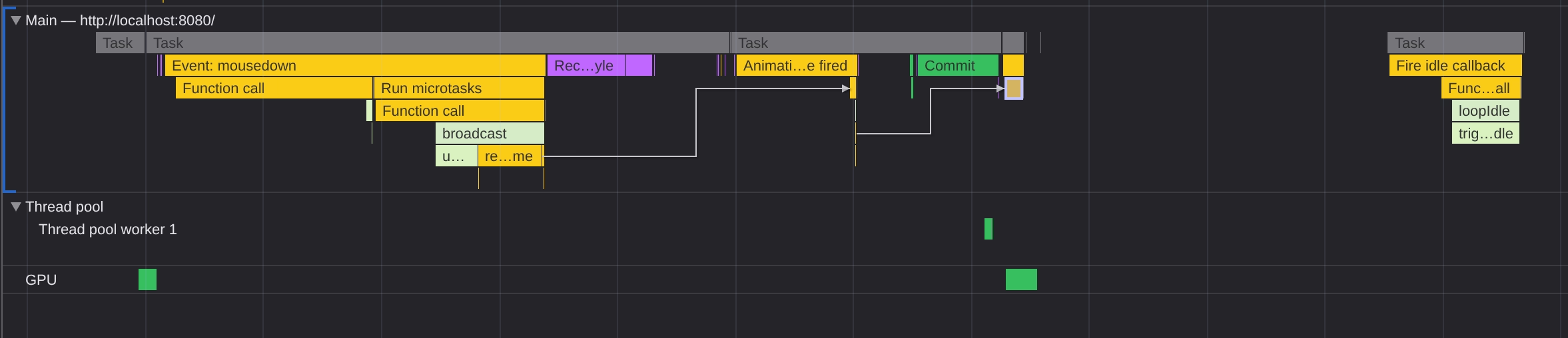
Here's a timeline example of these steps, you can see the idle subscribers are called way after the bulk of work when the browser condiders the page idle.
Final thoughts
There's an argument to say that only the original subscribers is needed, because the requestAnimationFrame+setTimeout or requestIdleCallback techniques can be used within subscriber functions to delay their processing, however I quite like the state system having these options.
Its up to you though adjust it however you like.
Final weigh in:
1.8kb uncompressed
628b gzip compressed
523b brotli compressed
Hopefully this has shown its not too difficult to write your own tools that you have full control and understanding of. We'll continue to look at building different SPA functionality in future posts.